Agent TARS vs UI-TARS Desktop: choose the right starting point
Choose UI-TARS Desktop for the graphical desktop app. Choose Agent TARS for the CLI and Web UI agent workflow. Choose the UI-TARS model repository when you need model weights or deployment instructions. These names identify different parts of the ecosystem, each with its own role.
Once you separate the model from the application, the download and setup choices become easier. Start with what you want to do, then connect the model and tools required for that workflow.
What each name means
| Name | Its role | Start here when you need… |
|---|---|---|
| UI-TARS | A family of vision-language models for graphical interface interaction. | Model weights, inference deployment or model research. |
| UI-TARS Desktop | A desktop application connecting a compatible model to computer or browser operator workflows. | A graphical app and an installer for your operating system. |
| Agent TARS | A general multimodal agent stack primarily offered through a CLI and Web UI, with browser and tool integration. | A terminal-based agent workflow, Web UI or MCP-connected tools. |
The official UI-TARS-desktop repository contains both the Desktop project and Agent TARS. The UI-TARS model family has a separate model repository. That is why opening the same software repository can lead you to two different setup paths.
If you want a desktop app, use UI-TARS Desktop
Download the installer matching your OS and processor, open the app and configure its VLM provider. You will need the endpoint URL, API key and model identifier supplied by your deployment. The Desktop setup guide walks through those fields with screenshots.
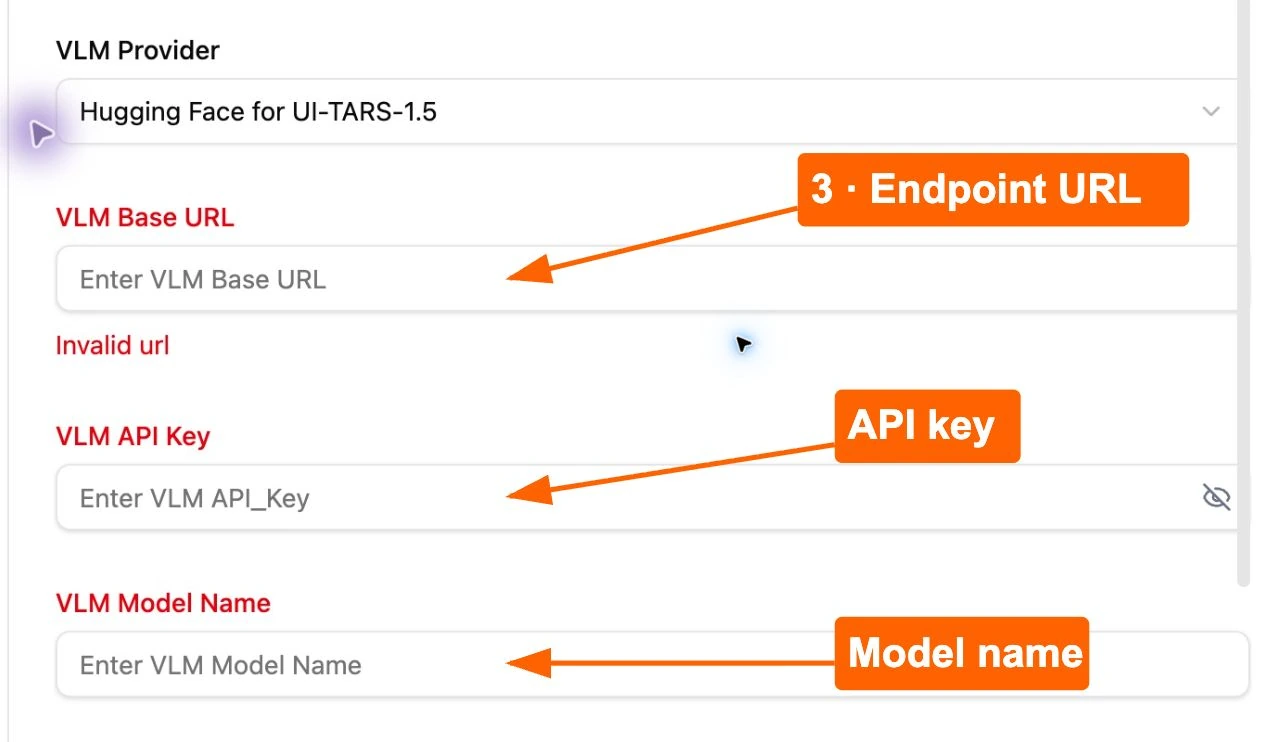
After the availability check succeeds, choose the computer or browser workflow and verify one small task. This gives you a clear result to inspect before moving on to larger examples.
If you want a CLI and Web UI, use Agent TARS
Agent TARS provides a command-line entry point and a Web UI. Its documented browser integration supports visual interaction, DOM interaction and a hybrid strategy. MCP integration connects the agent to additional tools.
The repository’s quick start specifies Node.js 22 or newer for the global CLI installation. Its npm package is @agent-tars/cli. A documented launch command is:
npx @agent-tars/cli@latestThis command is the documented entry point. Before running it, review the current package and configure a supported provider and model. A command that starts the UI is one part of setup; the provider and enabled tools determine what the workflow can do.
For the current instructions, open the project’s Agent TARS documentation and find Quick Start, CLI, Web UI, Browser and MCP. Match configuration examples to your provider’s current model identifiers instead of copying an older identifier.
If you need the model itself, use UI-TARS model resources
The model repository is the starting point for weights, evaluation information and inference deployment. Use its deployment instructions to turn a model into a running endpoint when that is what your application needs.
Once the endpoint is available, return to the application you chose and enter its connection details. A model name identifies the inference component; the application supplies the interface and operator or tool workflow.
Choose by the task you want to complete
- “I want to install an app and try computer control.” Follow the UI-TARS Desktop installation steps.
- “I want a terminal workflow with browser and other tools.” Review the Agent TARS CLI/Web UI setup and the integrations your task requires.
- “I want to host or evaluate the model.” Start with the UI-TARS model repository and its deployment requirements.
In each case, confirm the provider connection and begin with a small task whose result is easy to verify. Then use the existing examples to plan your next step.
Common questions
Is Agent TARS a newer version of UI-TARS Desktop?
The official repository presents them as separate projects in the same stack. Compare their roles and release assets rather than arranging their version numbers into one upgrade sequence.
Does installing either application include hosted inference?
Plan the model connection separately. Provider access, endpoint availability and inference costs depend on your chosen configuration.
Can Agent TARS control a browser?
The project documents browser interaction through visual, DOM and hybrid strategies. Choose a supported configuration and verify the task you want to perform.
A short answer you can reuse
UI-TARS is the model family, UI-TARS Desktop is the graphical application, and Agent TARS is the CLI/Web UI agent stack. For an installer and a computer or browser operator interface, start with Desktop. For a terminal workflow and tool integrations, start with Agent TARS. Configure the model/provider required by the application you choose.
Official sources checked 28 October 2026: bytedance/UI-TARS model README; bytedance/UI-TARS-desktop README, project comparison, Agent TARS Core Features and Quick Start. This article summarizes those documented roles. Model and software releases follow separate version histories.